


Служба поддержки
Контакты по застройщикам
Контакты по ипотеке и страхованию
Учетные записи
Добавить пользователя
Добавить агентство
Пространство для работы и встреч
Офлайн обучение
Вознаграждения
Тарифная карта
Быстрые выплаты
Конкурсы

Образовательные курсы для агентов
Обучения
Вебинары
Экскурсии на объекты
Информация
Самозанятым
Застройщикам
Налогообложение
Регламент по рекламе
Сервис сделки
Карьера
Офисы TrendAgent
Сверка
Контакты
OfficeAgent


Единая служба поддержки
SkillAgent
Support service
Developer contacts
Mortgage and insurance contacts
Accounts
Add user
Agency registration
Workspace and meeting rooms
Offline training
Motivation
Tariff card
Fast payments
Competitions
Educational courses for agents
Trainings
Webinars
Broker tours
Information
For self-employed
For developers
Taxation
Advertising regulations
Deal Service
Career
TrendAgent offices
Check
Contacts
OfficeAgent
Unified support service
SkillAgent



Self-Employed in Real Estate
Official status, easy transactions, transparent payouts

Self-employment is a legal and convenient form of work for specialists in the real estate sector
How to become self-employed?

Register in the "My Tax" app (or through a bank like T-Bank, Sberbank, or Alfa-Bank).
Registration
Confirmation
Confirm your registration and obtain self-employed status.
Tax
Pay taxes on your income:
- 4% from individuals
- 6% from legal entities
Limitations and important details
The maximum annual income for the self-employed is 2 400 000 roubles. This includes the full commission amount from developers, as per legislation and offer terms.
Income
Hiring
Self-employed individuals cannot hire employees or engage agents.
Exceptions
The developer CDS does not work with self-employed realtors.*
To qualify for LiderGroup projects, you need at least 6 months of confirmed employment. For more details, please contact the Project Manager.
*This restriction applies to St. Petersburg and specific developer offers.
A self-employed person is not allowed to represent another party under a commission contract, power of attorney, or agency agreement.
This applies only when a self-employed person works as an intermediary — a self-employed person can buy services from intermediaries for their own needs.
So, accepting the TrendAgent offer does not violate this rule — we act as your intermediary.
This applies only when a self-employed person works as an intermediary — a self-employed person can buy services from intermediaries for their own needs.
So, accepting the TrendAgent offer does not violate this rule — we act as your intermediary.
Acting as an intermediary
Reselling
Self-employed people are not allowed to resell goods, including retail sales or resale of rights (such as sublicensing).
Important
TrendAgent does not cooperate with self-employed individuals purchasing apartments for themselves with the intent of earning a commission.
We work with agencies under a commission agreement (you can view it here). According to this agreement:
TrendAgent acts as the commission agent, and the agency is the principal. This means that we act on our own behalf but at your expense, assuming operational commitments, such as signing a contract with a developer.
How is the remuneration calculated?
The remuneration for the agency (principal) and TrendAgent (commission agent) is outlined in the agreement (Section 6).
The agency receives a remuneration from the developer. TrendAgent deducts its percentage from this amount as a commission fee.
How is income calculated?
For tax purposes, the agency’s entire fee from the developer is considered income, even if part of it is withheld by us as a commission.
If the agency uses the simplified tax system (STS) "Income minus expenses," our commission can be treated as an expense to reduce the taxable base.
TrendAgent acts as the commission agent, and the agency is the principal. This means that we act on our own behalf but at your expense, assuming operational commitments, such as signing a contract with a developer.
How is the remuneration calculated?
The remuneration for the agency (principal) and TrendAgent (commission agent) is outlined in the agreement (Section 6).
The agency receives a remuneration from the developer. TrendAgent deducts its percentage from this amount as a commission fee.
(References: Article 248(1), Article 249(1, 2), Article 346.15(1) of the Russian Tax Code; Ministry of Finance Letters No. 03−11−11/112 598 dated 22.12.2020, No. 03−11−11/57 877 dated 01.08.2019, and No. 03−11−06/2/37 038 dated 15.06.2017).
How is income calculated?
For tax purposes, the agency’s entire fee from the developer is considered income, even if part of it is withheld by us as a commission.
If the agency uses the simplified tax system (STS) "Income minus expenses," our commission can be treated as an expense to reduce the taxable base.
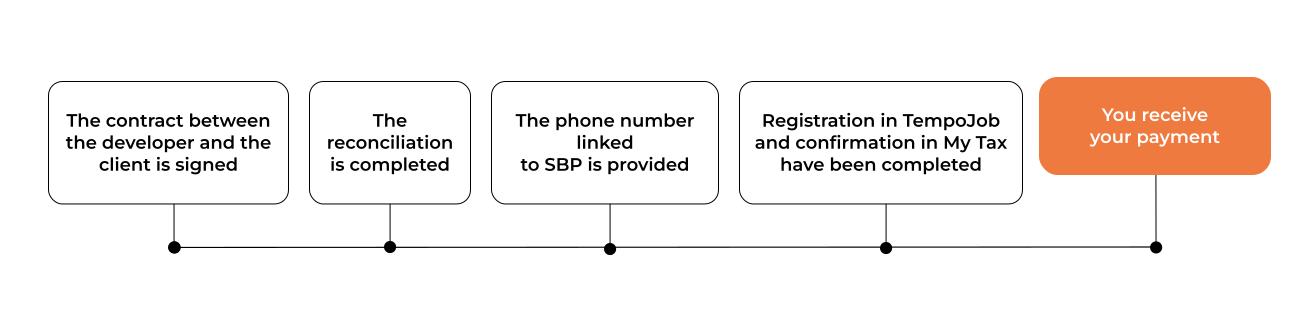
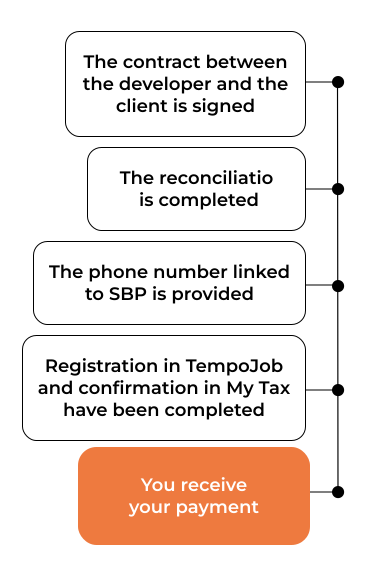
Receiving payments with us is easy
Step 1
Register in the TempoJob app following the instructions.
Step 2
We transfer your payment instantly via the SBP (Faster Payments System)
✅ Correction of information about my income submitted by the partner
✅ Income reporting on my behalf
✅ Obtaining a summary of your income
✅ Access to information about my tax payments
Do not select this option:
❌ Payment of tax charges on my behalf
✅ Income reporting on my behalf
✅ Obtaining a summary of your income
✅ Access to information about my tax payments
Do not select this option:
❌ Payment of tax charges on my behalf
You will receive notifications with tax already calculated based on your income.
A receipt for payments processed via ‘Jump.Work’ will be generated automatically.
You can request an income report at any time.
You can cancel a receipt anytime if you notice an error in the amount or if the payment was made by mistake.
Generating Receipts: Quick and Easy
If you receive a fast payout, you will have two receipts:
— The first receipt is generated when the payment is received, for the actual amount received.
— The second receipt is generated by the TrendAgent accounting team once a month.
— The first receipt is generated when the payment is received, for the actual amount received.
— The second receipt is generated by the TrendAgent accounting team once a month.
Receipts
Receipt in Jump
All receipts are generated automatically through the TempoJob service.
Do not create them manually, and disable automatic receipt generation in other services (especially in banking apps) to avoid duplication.
Do not create them manually, and disable automatic receipt generation in other services (especially in banking apps) to avoid duplication.
Taxes
The tax is calculated automatically by the "My Tax" service based on the generated receipts. It is accrued monthly after the 10th for all receipts from the previous month.
You can pay the tax in the "My Tax" service or in your banking app.
You can pay the tax in the "My Tax" service or in your banking app.
Create the second receipt in the "My Tax"
Open the "My Tax" app and select "Add Receipt".
Fill in the receipt fields:
1. In the "Amount" field, specify the total deductions: the license fee and the commission. An example of where these fields are located can be found in the commission agent’s report.
2. You can find which franchise made the payment in the approval sheet.
3. Payment Purpose: Specify "Client referral (‘Client's Full Name') for property purchase."
4. The date of the second receipt: Use the date you received the commission report.
You can find instructions on how to generate a receipt here.
Fill in the receipt fields:
1. In the "Amount" field, specify the total deductions: the license fee and the commission. An example of where these fields are located can be found in the commission agent’s report.
2. You can find which franchise made the payment in the approval sheet.
3. Payment Purpose: Specify "Client referral (‘Client's Full Name') for property purchase."
4. The date of the second receipt: Use the date you received the commission report.
You can find instructions on how to generate a receipt here.

FAQ
- Our cooperation model complies with Federal Law No. 422-FZ. The law prohibits self-employed individuals from participating in the activities of other parties under mandate, commission, or agency agreements. However, we do not do this.
- When we have a DVOU agreement with a developer, we enter into a commission agreement with the agency. In this case, we act as the service provider in relation to the self-employed individual, not the other way around. This means that self-employed specialists do not violate 422-FZ.
- Our work is based on a public offer. This is a legal form of concluding a contract. A self-employed individual accepts the offer when they start working on our platform, which makes the cooperation fully legal.
Thus, self-employed specialists work with us within the framework of the law and do not violate the conditions for applying this tax regime.
- Yes, an individual entrepreneur can switch to the NPD (professional income tax) regime. To do this, the IE must meet the conditions for applying this regime and follow these steps:
- Refuse the current tax regime. This can be done in the taxpayer’s personal account. You need to select the "Life Situations" section and follow the system instructions.
- After deregistration, submit reports up to the last working day and pay contributions and taxes.
- Apply for NPD. This can be done, for example, in the "My Tax" mobile app.
- Wait for notification from the tax authority. If everything is correct, the tax authority will send a notification about the transition to the new regime, and you can continue working with your IE, but now as a self-employed person.
It is also possible to first fully close the existing IE and then register as self-employed.
Please note that a self-employed person’s income includes the full amount of remuneration from the developer, including the TrendAgent commission.
If the total annual income exceeds 2,400,000 RUB (the limit for self-employed individuals), this status can no longer be applied. It is necessary to switch to a different tax regime and submit a request to update the agency details so that the information in the system is accurate and reflects the actual tax regime being used.
If the total annual income exceeds 2,400,000 RUB (the limit for self-employed individuals), this status can no longer be applied. It is necessary to switch to a different tax regime and submit a request to update the agency details so that the information in the system is accurate and reflects the actual tax regime being used.
Yes, if you are registered as an IE on NPD, you can receive payments for transactions to your debit card, just like with regular self-employment.
Consider the example of an IE on the simplified tax system (STS).
Yes, it is possible. However, the taxation procedure will depend on whether the income was received before the date of registration as an IE on STS.
Yes, it is possible. However, the taxation procedure will depend on whether the income was received before the date of registration as an IE on STS.
- If the remuneration has not yet been transferred (neither by the developer nor to the real estate agency), the income is not considered received, as the agency has not acquired the right to dispose of the funds.
- In this case, no tax obligation arises. This position is confirmed by clarifications of the Russian Ministry of Finance (Letter dated January 13, 2025 No. 03−11−11/1015).
- If the remuneration was transferred before registering as an IE, the income is considered received as an individual and is subject to personal income tax (PIT), not tax under the simplified taxation system (STS).
All receipts are generated automatically by the TempoJob service.
Receipts for the previous month must be created by the 9th day of the month following the month in which the income was received. The tax must be paid by the 28th day of the following month.
Example:
Payment was received on January 15
The receipt must be generated by February 9
The tax must be paid by February 28
Receipts for the previous month must be created by the 9th day of the month following the month in which the income was received. The tax must be paid by the 28th day of the following month.
Example:
Payment was received on January 15
The receipt must be generated by February 9
The tax must be paid by February 28
To avoid duplicate payments, the receipt you created must be canceled. In the "My Tax" app, tap the amount you want to cancel → three dots → cancel → select "created by mistake"
The duplication occurred on the bank’s side. This can be seen in the payment description field: "Self-employed service". SberBank automatically generates a receipt for incoming payments — this one can be canceled.
We recommend removing the "Svoe Delo" service, as its functions are replaced by TempoJob. If you prefer not to remove it, you will need to regularly cancel duplicate receipts either in the "Svoe Delo" service or in the "My Tax" app after each payment.
We recommend removing the "Svoe Delo" service, as its functions are replaced by TempoJob. If you prefer not to remove it, you will need to regularly cancel duplicate receipts either in the "Svoe Delo" service or in the "My Tax" app after each payment.
The tax amount will be shown in your account as an overpayment. This amount will be applied toward future tax payments.
As a self-employed person, you can receive payments to any account or card. Even if the payment is made to an account not linked to the "My Tax" app, TempoJob will still declare the income in the app and generate a receipt. Tax is calculated only on the declared amount.
To receive remuneration, you must register in TempoJob. This is a mandatory requirement. Otherwise, we will not be able to make a payment to you.
By using TempoJob, as a self-employed person you can receive instant payments via the Faster Payments System (SBP), automatically generate receipts for all amounts, and track your annual income limit.
Your account can be opened in any bank; there is no need to open additional accounts. You only need to register in TempoJob and provide a phone number linked to SBP and your bank, or a business card number (for IE on NPD).
In this case, you need to register in TempoJob using the phone number specified in "My Tax". For payments, you should provide us with the phone number linked to SBP.
This means that you can cancel a receipt at any time if you notice an error in the amount or if the payment was made by mistake. Our cooperation does not involve canceling receipts on our side.
Yes. You need to go to the "My Tax" app, open settings → partners → and disable these permissions.
We have switched from JUMP to TempoJob for working with self-employed specialists.
Payments
To receive payment, you need to register in TempoJob. Permissions for JUMP can be revoked if they are no longer needed. There is no need to update your details (phone number and bank name OR business card number for IE on NPD) — we will make the payment using the details you previously provided.
Payments
To receive payment, you need to register in TempoJob. Permissions for JUMP can be revoked if they are no longer needed. There is no need to update your details (phone number and bank name OR business card number for IE on NPD) — we will make the payment using the details you previously provided.
An IE on NPD can receive payment to a business account only via a business card number. If you do not have a business card, you can receive payment to a personal account using your phone number and bank name as an individual.